> For the complete documentation index, see [llms.txt](https://docs.arbitrix.xyz/llms.txt). Markdown versions of documentation pages are available by appending `.md` to page URLs; this page is available as [Markdown](https://docs.arbitrix.xyz/readme.md).
# Arbitrix Trading Dashboard
Arbitrix Protocol is a comprehensive decentralized framework designed for systematic cryptocurrency arbitrage trading. Unlike traditional approaches that focus on individual opportunities, Arbitrix simultaneously analyzes arbitrage across three interconnected dimensions: **temporal** (spot vs futures), **spatial** (cross-exchange), and **financial** (funding rates). The system processes real-time market data from multiple exchanges to identify profitable trading opportunities while managing risk through sophisticated algorithms.
### Platform Overview
Arbitrix provides a professional-grade arbitrage detection and analysis platform with:
* **Live orderbook data** from Aster, Backpack, and zkLighter exchanges
* **Funding rate comparisons** showing optimal yield opportunities
* **Real-time arbitrage alerts** highlighting profitable trades
* **Historical performance tracking** for strategy optimization
***
### How Arbitrage Detection Works
#### Understanding the Three Arbitrage Dimensions
***
#### 1. Temporal Arbitrage: Spot vs Futures Convergence
This strategy exploits the natural relationship between spot prices (immediate delivery) and futures prices (contractual future delivery) on the same exchange.
**Mechanism:**
* System monitors BTC spot and futures prices continuously
* When futures trade at a premium, buy spot and sell futures simultaneously
* Profit materializes as futures price converges toward spot price
**Real-World Example:**
**Aster Exchange BTC Data:**
* Spot Ask Price: $114,309.00
* Futures Bid Price: $114,821.00
* Basis (difference): $512.00
* After fees: Net profit \~0.448%
The dashboard updates these calculations in real-time as prices change.
***
#### 2. Spatial Arbitrage: Cross-Exchange Price Differences
This identifies when the same cryptocurrency trades at different prices across exchanges.
**Mechanism:**
* Compare BTC prices across Aster, Backpack, and zkLighter simultaneously
* Execute buy on cheaper exchange, sell on expensive exchange
* Account for trading fees and transfer costs
**Real-World Example:**
**Price Comparison:**
* Aster BTC: $114,309.00 (cheapest)
* Backpack BTC: $114,670.00 (most expensive)
* Price difference: $361.00
**Fee Calculation:**
* Buy fee (Aster): 0.035% = $40.01
* Sell fee (Backpack): 0.10% = $114.67
* Transfer cost: \~$2.00 (blockchain fee)
* **Net profit: $204.32 or 0.179%**
***
#### 3. Financial Arbitrage: Funding Rate Optimization
This strategy captures differences in funding rates between perpetual futures contracts.
**Mechanism:**
* Compare funding rates across exchanges (paid every 8 hours)
* Position long on negative rate exchange, short on positive rate exchange
* Capture funding rate differential continuously
**Real-World Example:**
**Funding Rate Comparison:**
* Aster: +0.03% (longs pay shorts)
* Backpack: -0.02% (shorts pay longs)
* Differential: 0.05% per 8h period
**Position Strategy:**
* Long Backpack BTC futures (receive 0.02% funding)
* Short Aster BTC futures (receive 0.03% funding)
* Net per period: 0.05%
* **Daily return: 0.15% | Annual return: \~54.7%**
***
### Step-by-Step Guide
#### 1. Launch the Dashboard
Navigate to to access the professional trading interface.
#### 2. Explore Live Data
* **Left panel** displays all trading pairs across 3 exchanges
* **Green dots** indicate active data connections
* **Red "ARB" badges** highlight arbitrage opportunities
#### 3. Analyze a Trading Pair
Click on "BTC" to see detailed analysis:
* Three exchange cards (Aster, Backpack, zkLighter)
* Live orderbooks with bid/ask levels
* Funding rates and arbitrage calculations
#### 4. Understand Arbitrage Alerts
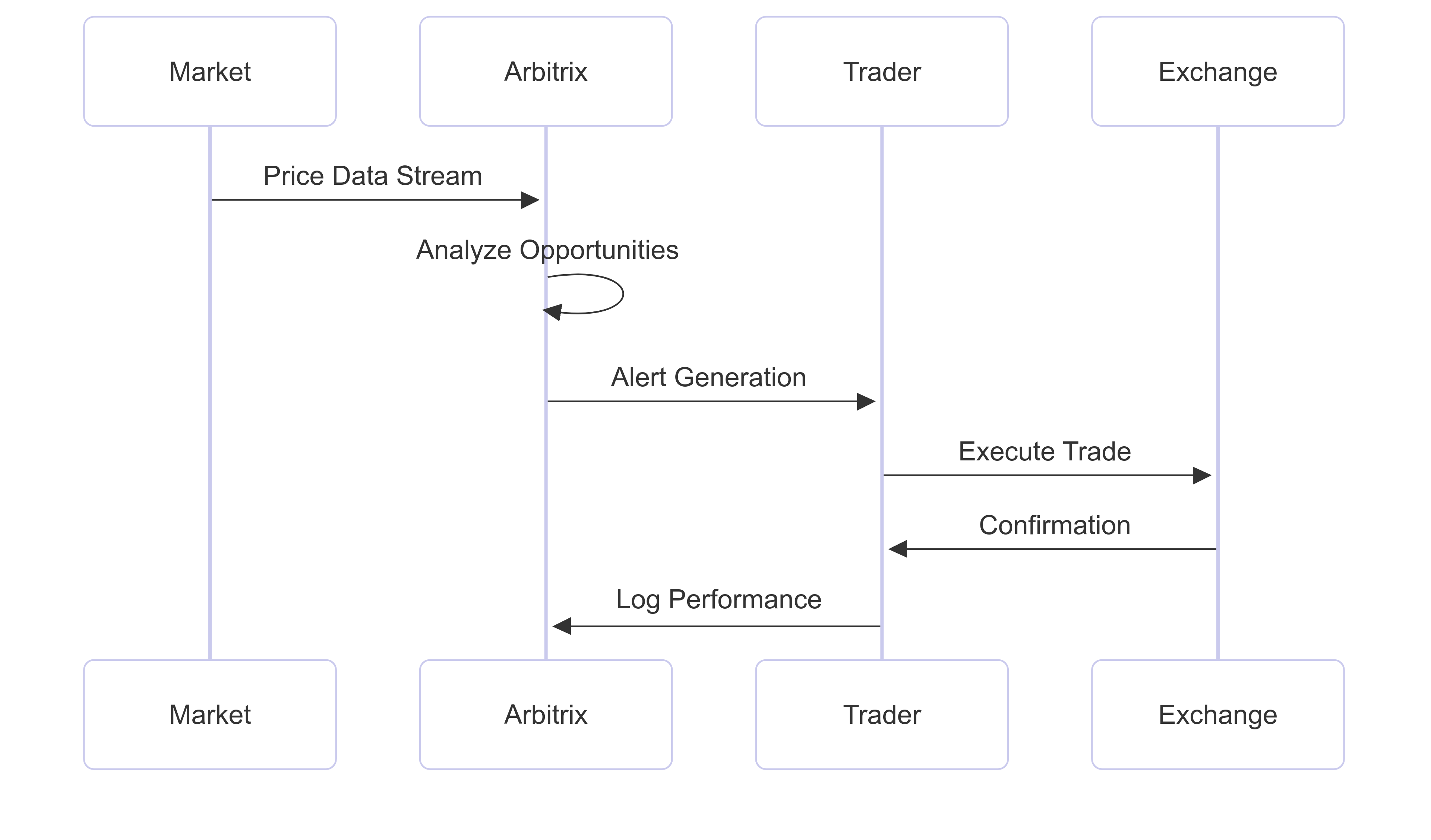
When opportunities appear, you'll see alerts like:
```
FUNDING: Long Backpack, Short Aster | Daily: 0.12% | Annual: 43.8%
PRICE: Buy Aster @ $114,309 | Sell Backpack @ $114,670 | Net: 0.179%
```
#### 5. Monitor Performance
Right panel shows live logs of arbitrage detections with timestamps and profitability calculations.
***
### Trading Strategy Overview
***
### Why Arbitrix Protocol?
Arbitrix Protocol represents the future of arbitrage trading by combining the precision of quantitative finance with the accessibility of decentralized systems. Through its sophisticated multi-dimensional analysis, real-time processing capabilities, and community governance, the protocol democratizes access to institutional-grade arbitrage tools.
The live dashboard experience demonstrates how complex arbitrage concepts can be made accessible and actionable. Whether you're an individual trader learning arbitrage mechanics, a professional seeking systematic alpha generation, or an institution requiring robust risk management, Arbitrix provides the tools and intelligence needed to succeed in cryptocurrency arbitrage.
By transforming market inefficiencies into systematic profit opportunities while maintaining transparency and community control, Arbitrix Protocol establishes a new standard for decentralized arbitrage platforms.
***
**Ready to explore arbitrage opportunities?** Launch the dashboard and start your journey into systematic alpha generation.
***
*Last updated: September 09, 2025*
---
# Agent Instructions
This documentation is published with GitBook. GitBook is the documentation platform designed so that both humans and AI agents can read, navigate, and reason over technical content effectively. Learn more at gitbook.com.
## Querying This Documentation
If you need additional information that is not directly available in this page, you can query the documentation dynamically by asking a question.
Perform an HTTP GET request on the current page URL with the `ask` query parameter, and the optional `goal` query parameter:
```
GET https://docs.arbitrix.xyz/readme.md?ask=&goal=
```
`ask` is the immediate question: it should be specific, self-contained, and written in natural language.
`goal` is optional and describes the broader end goal you are ultimately trying to accomplish on behalf of the user. GitBook uses it to tailor the answer towards what is most useful for that goal.
The response will contain a direct answer to the question and relevant excerpts and sources from the documentation.
Use this mechanism when the answer is not explicitly present in the current page, you need clarification or additional context, or you want to retrieve related documentation sections.